E-Invoicing for PrestaShop
-
 Creates human-readable e-invoices in the hybrid ZUGFeRD format
-
Facilitates invoice import into accounting software for you and your customers
-
Compliant with German and EU standards (EN 16931)
-
Validates conformity with integrated KoSIT validation
By using the module, you accept our terms of use and privacy policy for the Codebarista E-Invoicing Service.
How it Works
The module automatically converts invoice PDFs into e-invoices.
| Scenario | Covered |
|---|---|
| Invoice download in the back office | ✓ |
| Invoice download in the customer account | ✓ |
| Invoice attachment in the order confirmation email | ✓ |
| Invoice attachment in status update emails | ✓ |
| Bulk PDF download in the back office | ✓ |
| Delivery notes and return documents | – |
The module integrates into the PrestaShop document creation process and uses the Codebarista E-Invoicing Service: the required data is collected in the module, transferred to the E-Invoicing Service, processed there in a privacy-compliant manner, and the finished ZUGFeRD PDF is then returned to your shop.
ZUGFeRD and XRechnung
The ZUGFeRD 2 format combines PDF and XML in a hybrid document. The invoice remains human-readable while machine-readable XML data is embedded simultaneously, which can be processed directly by accounting software. The embedded XML file conforms to the XRechnung standard and the European format EN 16931. For an explanation of these terms and how XRechnung and ZUGFeRD relate to each other, see ZUGFeRD, XRechnung & Co.: E-Invoice Formats Explained.
Administration
System Requirements
The module requires at least PHP version 7.2.5 and PrestaShop version 8.
License
The settings can be found in the PrestaShop back office under Modules > Module Manager, then click Configure for the module.
The module requires an active license to generate e-invoices. You can try it for free, without providing payment information.
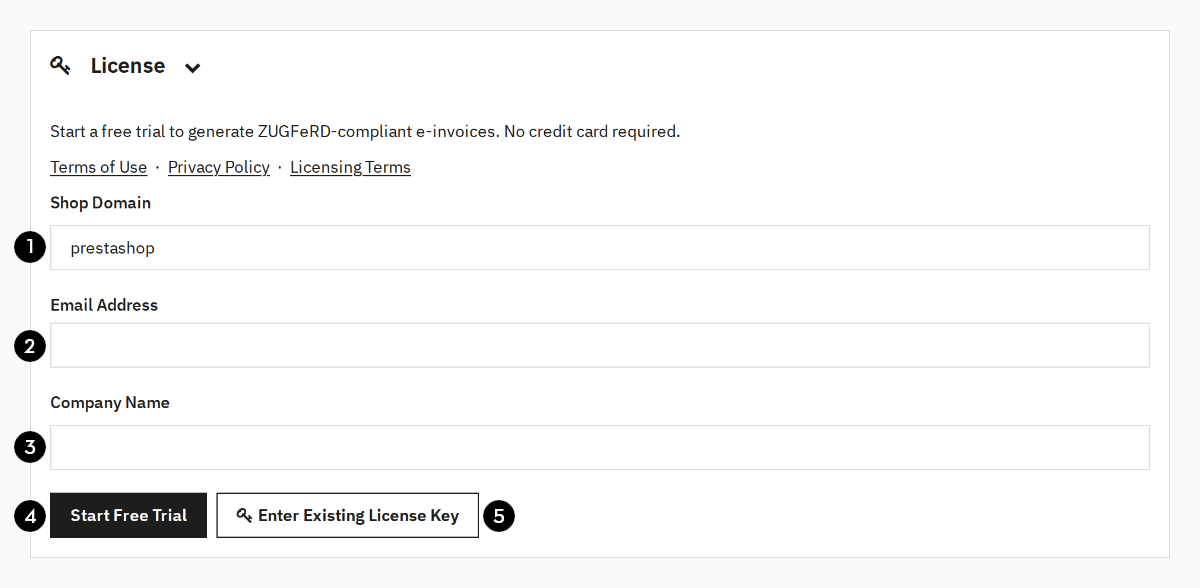
On the configuration page, enter your shop domain (1), email address (2), and company name (3), then click Start Free Trial (4). Note that the license is tied to your shop domain. After submitting your details, you will receive a confirmation email within a few minutes. Click the link in it to activate the trial.
If you already have a license for this domain, you can activate it via Enter Existing License Key (5).
Configuration
The settings can be found in the PrestaShop back office under Modules > Module Manager, then click Configure for the module.
The module uses information from the order, shop settings, and module settings to create the e-invoice.
Changes to the settings do not affect already created invoices. You must regenerate invoices for the changed settings to take effect.
Shop / Seller Information
Enter your company details here.
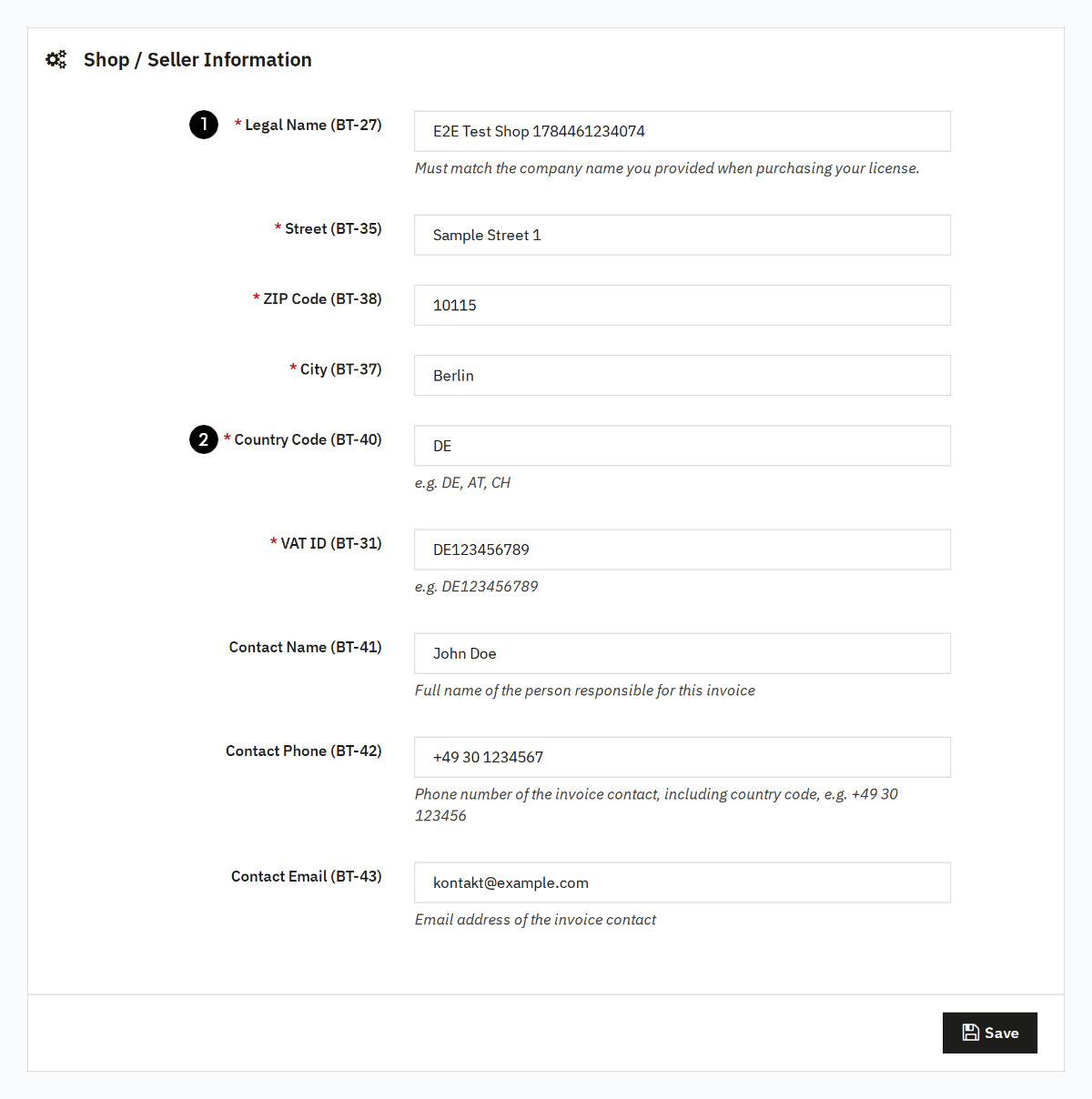
The legal name (1) is the legal name of your company.
It must match the name you provided when purchasing the license.
The country code (2) must be entered as an ISO code, e.g. DE, AT, CH.
If the configured company name does not match the company name provided when the license was purchased, no e-invoices can be created.
Payment Methods
The e-invoice states how the invoice is settled (BT-81). Your customer's accounting software uses this to determine whether the amount has already been collected or still has to be transferred, and in that case to which account.
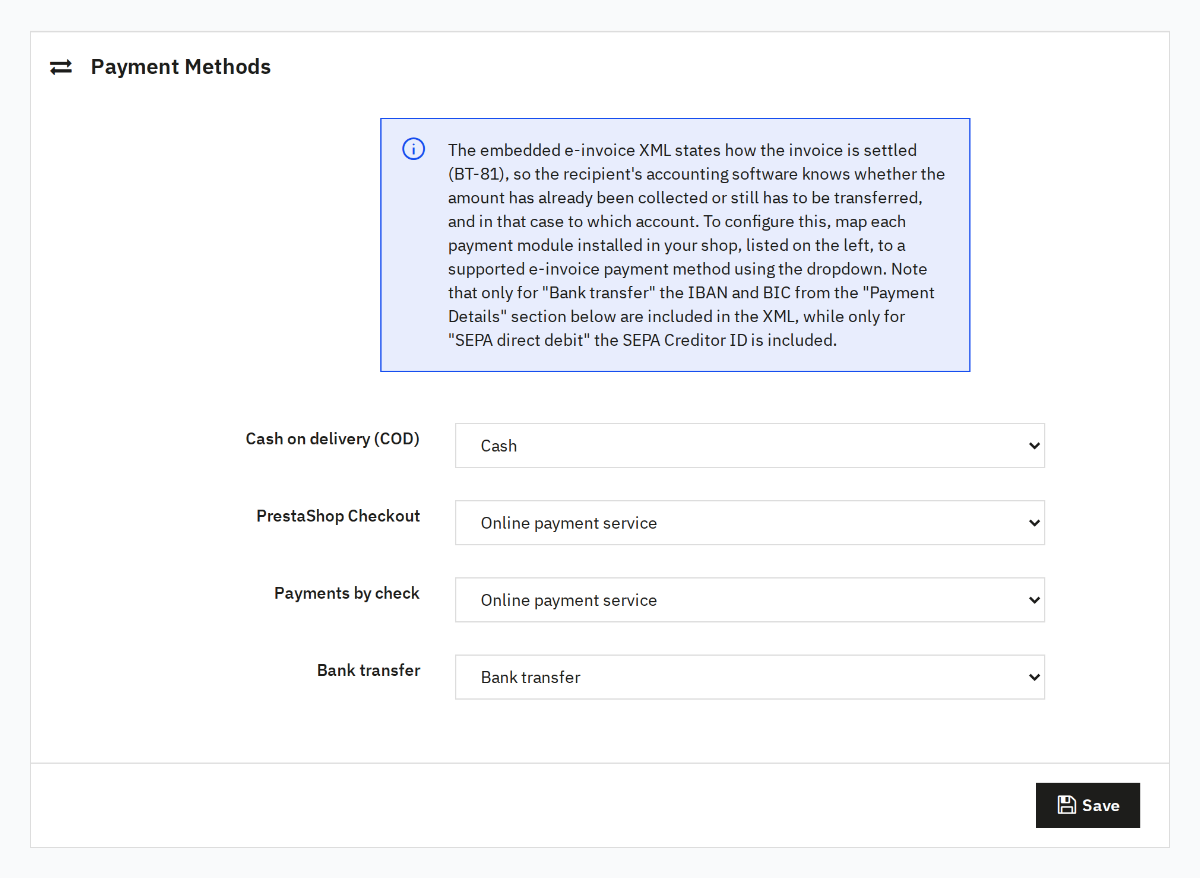
The module lists every payment module installed in your shop, plus every payment module used by an existing order. Use the dropdown to assign the matching payment method to each payment module.
| Payment method | Meaning in the e-invoice |
|---|---|
| Online payment service | The payment was processed by a payment service provider, e.g. PayPal or Stripe. |
| Bank transfer | The amount still has to be transferred. IBAN and BIC from the payment details are included. |
| SEPA direct debit | The amount is collected by SEPA direct debit. The SEPA Creditor ID from the payment details is included. |
| Direct debit | The amount is collected through a non-SEPA direct debit scheme, e.g. CH-DD of the Swiss PostFinance or the Polish Polecenie Zapłaty. |
| Cash | Cash payment, e.g. cash on delivery. |
The matching payment methods are preselected for the PrestaShop standard modules Bank transfer and Cash on delivery. All other payment modules default to Online payment service, which is the correct choice for the vast majority of third-party payment modules. Review the mapping nonetheless and then save it. If no payment module can be determined for an order, the module also falls back to Online payment service.
Payment Details
The payment information entered here is embedded into the e-invoice. Make sure it matches the payment information on your PDF invoices.
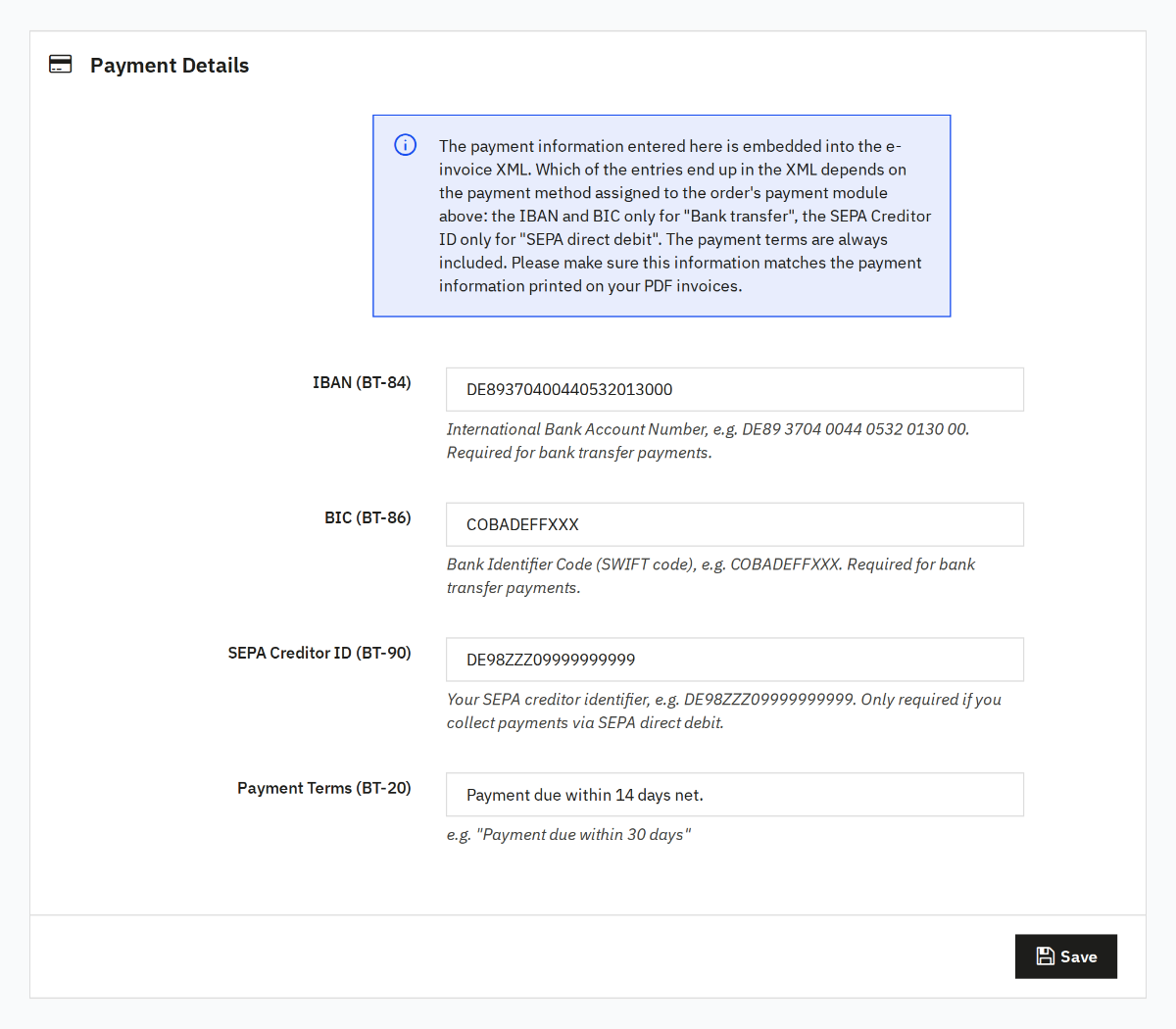
Which of these entries actually end up in the e-invoice depends on the payment method assigned to the order's payment module: IBAN and BIC are only included for Bank transfer, the SEPA Creditor ID only for SEPA direct debit. The payment terms, e.g. Payable within 30 days, are always included.
Create E-Invoice
The e-invoice module integrates seamlessly into the order detail page.
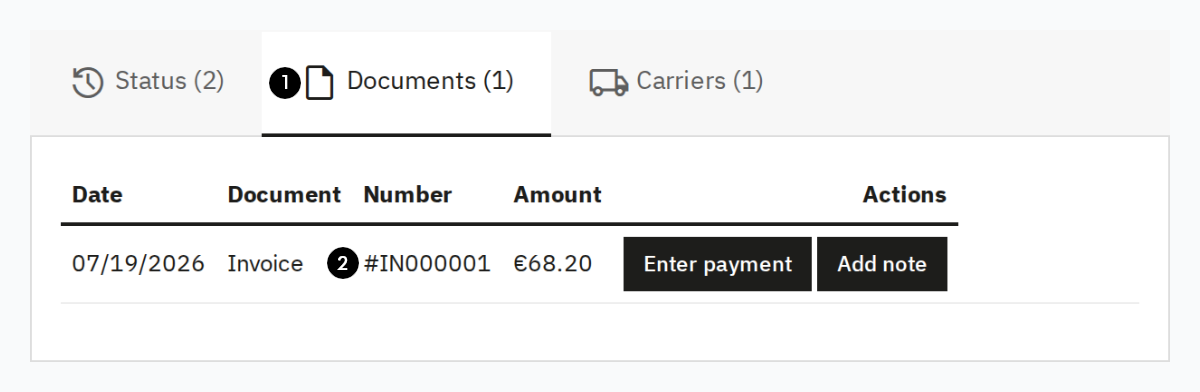
To create an e-invoice, click the download link (2) for an existing invoice in the documents table (1). The module generates the ZUGFeRD PDF in the background.
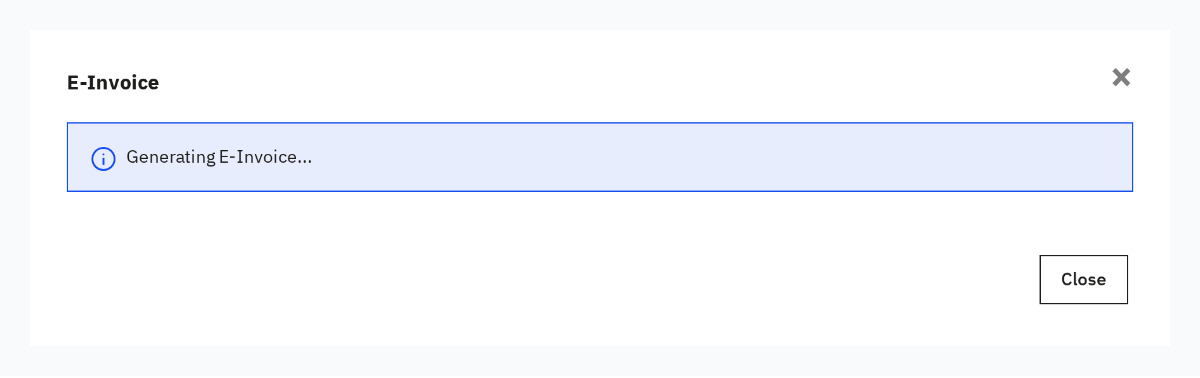
A dialog shows the progress; once complete, the download starts automatically. If the dialog does not appear, go to the settings and check whether an active license is present.
Every generated e-invoice is automatically checked for compliance with the XRechnung standard using the KoSIT Validator. For details on what exactly is checked and what the different validation results mean, see Validating e-invoices with the KoSIT validator.
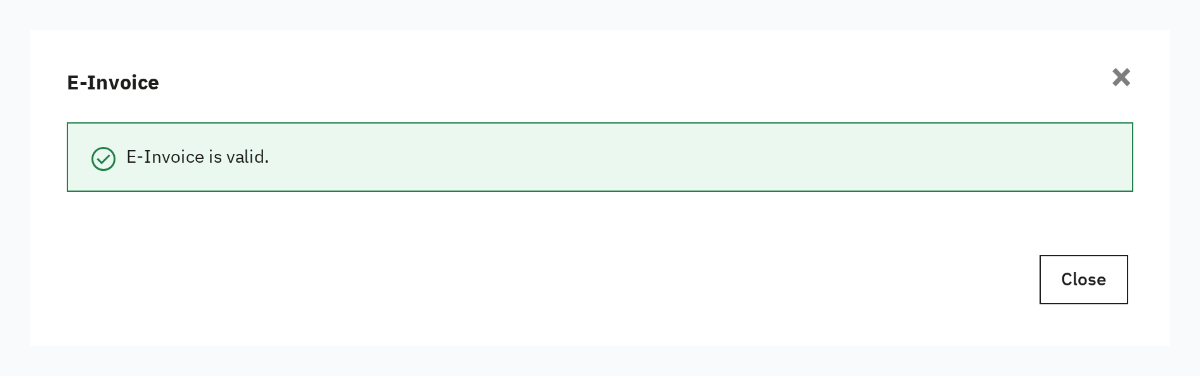
The validation result is displayed in the dialog immediately after the download and stored in the E-Invoice card.
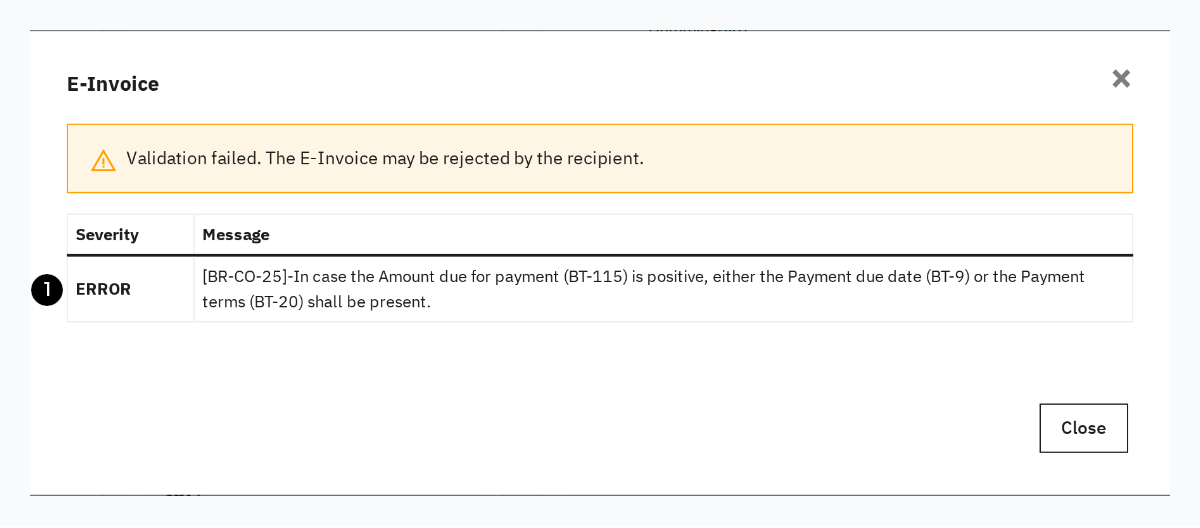
If the generated e-invoice is not valid, the found issues are listed (1). Review the result and adjust the configuration if necessary.
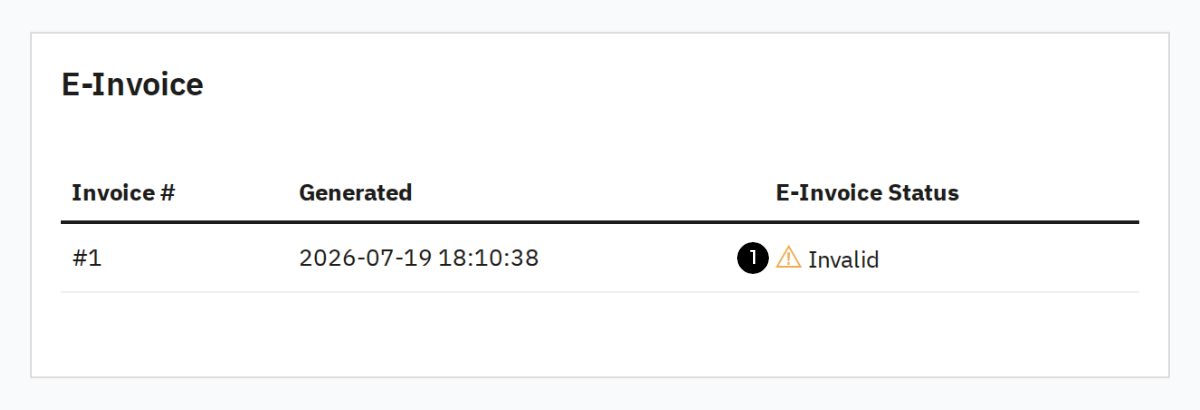
The E-Invoice card on the order detail page shows the status of the last e-invoice created for this order. Clicking the validation result (1) opens the report.
Bulk Generation
To generate E-Invoices for multiple orders navigate to the Orders > Invoices page.
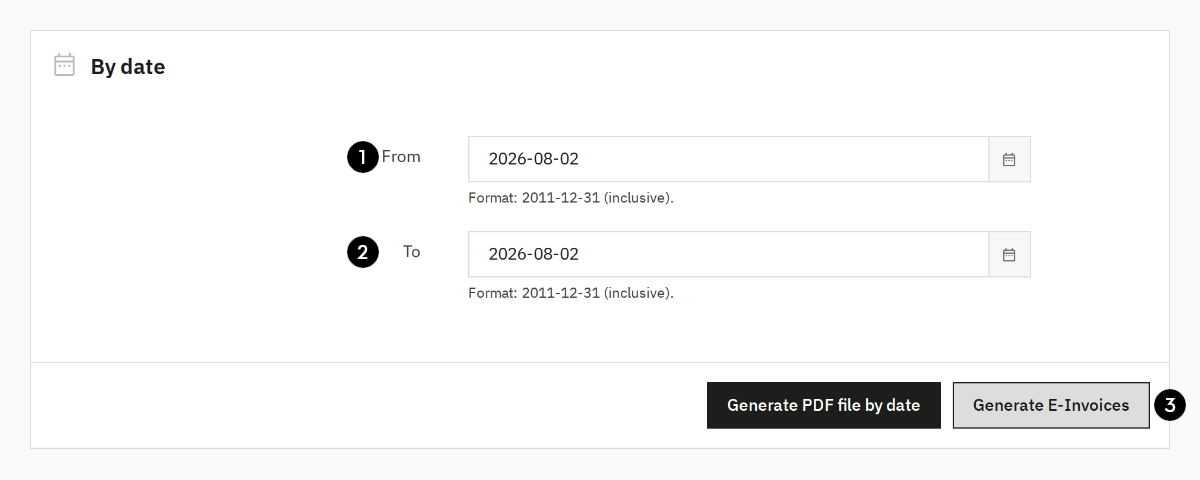
If you want to create E-Invoices for all orders that fall within a certain date range, select a from (1) and a to (2) date and then press Generate E-Invoices (3).
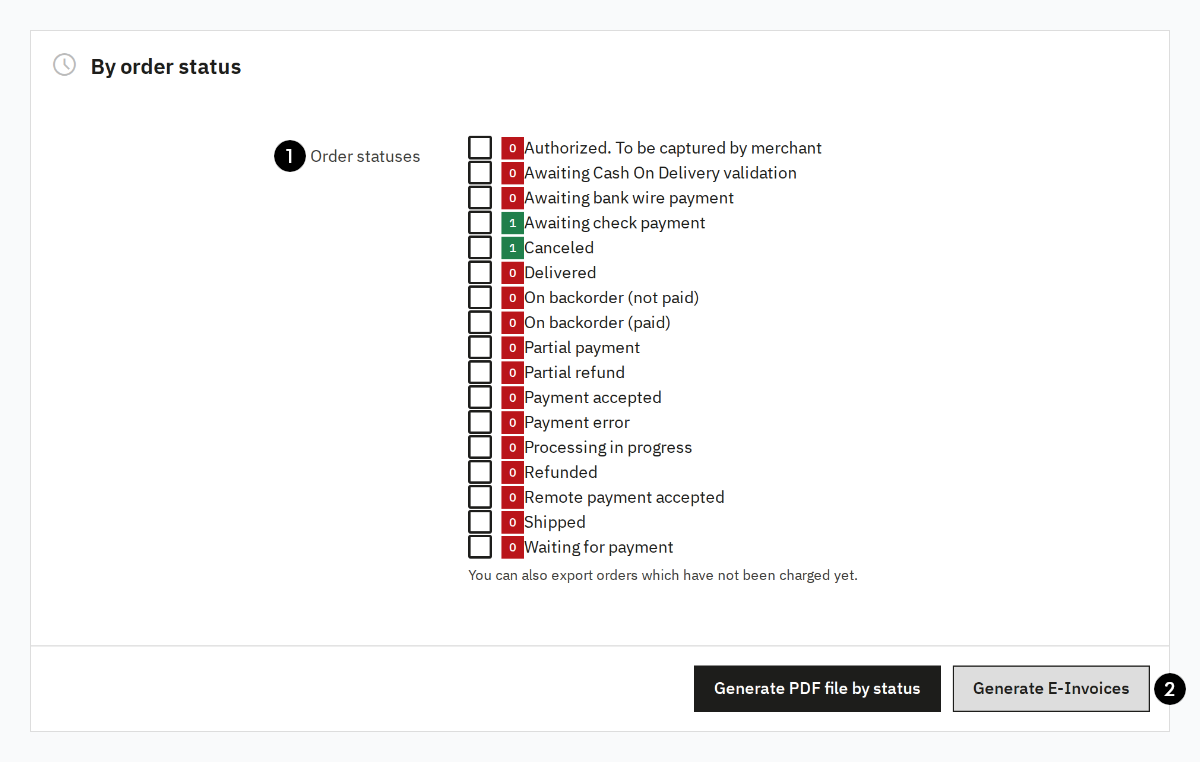
To generate E-Invoices by order status, mark the checkbox (1) for each status for which an E-Invoice shall be generated and then press Generate E-Invoices (2).
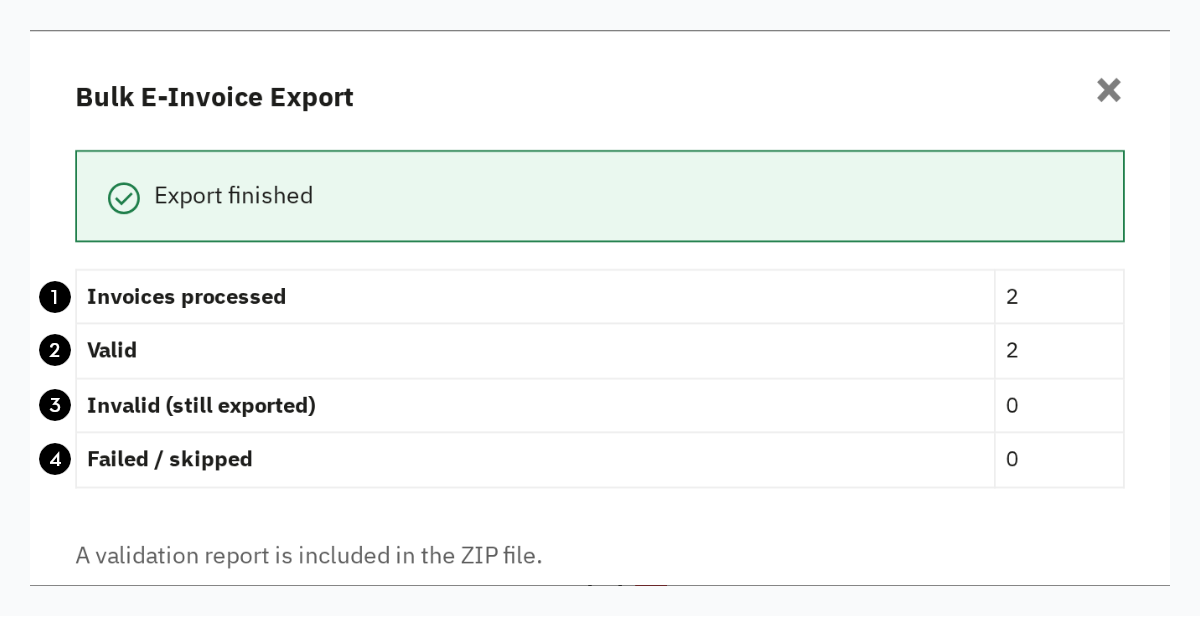
Once the bulk generation is complete the ZIP with all E-Invoice PDFs will be downloaded. A dialog opens where you can see how many orders have been processed (1) to generate E-Invoices and how many of the generated E-Invoices have passed (2) or failed (3) the KoSIT validation. You can also see how many E-Invoices could not be generated at all (4).
The ZIP will contain a report with more detailed information about validation failures and processing errors.
Special Tax Rules
You can also map intra-community supply and reverse charge with the e-invoice module. To do this, you need to configure the tax rules in your shop accordingly and select which of the two tax liability reversal procedures should be used.
Configure Shop
To apply a 0% tax rate to orders from other EU countries, you need to configure the tax rules in PrestaShop accordingly. It is recommended to import the tax rules for the respective country via International > Localization: select the country from the list and click Import.
Then open International > Taxes > Tax Rules and adjust the rules for each relevant tax rate to a 0% tax rate.
Without an additional module, it is not possible in PrestaShop to restrict a 0% tax rate to B2B customers with a VAT ID.
Tax Exemption Treatment
For line items with a 0% tax rate to be processed correctly, you need to select how this tax rate should be handled.
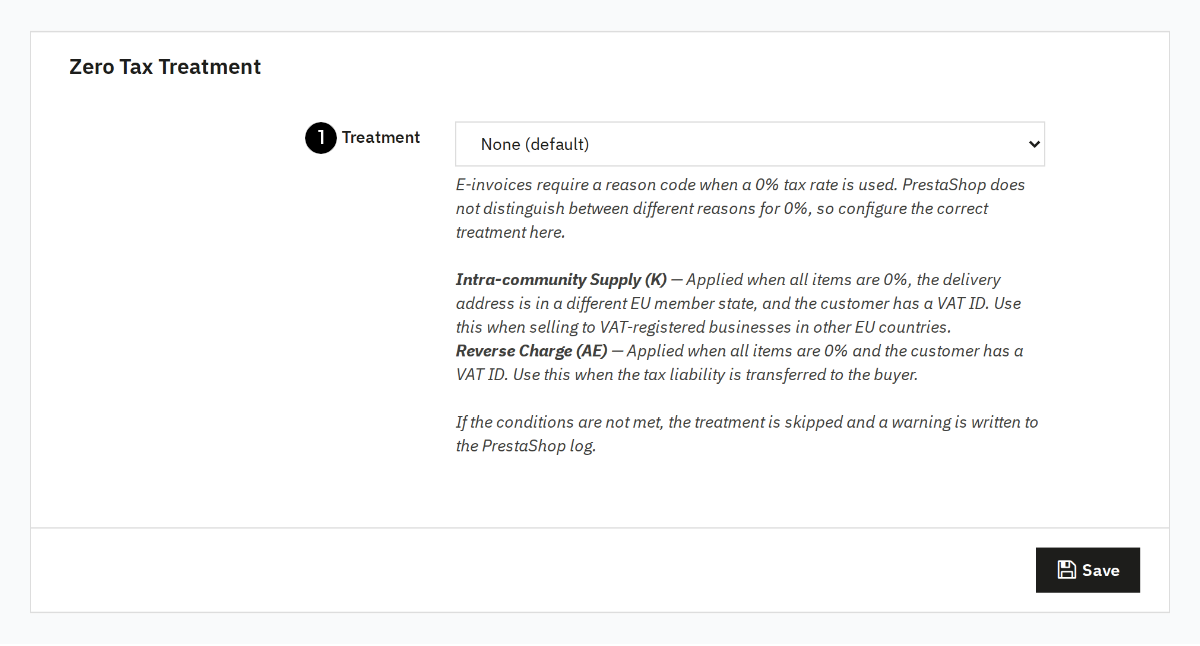
Select a treatment (1) from the list: Choose intra-community supply (Category K) or reverse charge (Category AE) as appropriate. For both options, the corresponding tax exemption reason is used automatically. No treatment means that line items with a 0% tax rate receive category Z for zero rated goods.
For background information on the individual categories and when each applies, see VAT categories in e-invoices (S, Z, K, E, AE). For the legal background on intra-community supply, see Intra-community supply in e-invoices, and for the legal background on reverse charge, see Reverse charge in e-invoices.
FAQ
What invoice formats does the module generate?
The module generates e-invoices in the ZUGFeRD 2 format with the XRechnung profile. For an explanation of what that means, see ZUGFeRD, XRechnung & Co.: E-Invoice Formats Explained.
Does the e-invoice replace my existing PDF invoice?
No. The module extends the PDF document created by PrestaShop by embedding XRechnung XML in it.
Do I need to adjust my existing processes?
No. The module integrates into the existing PrestaShop process. You continue to create invoices as usual. As soon as you download an invoice, the module automatically generates the corresponding e-invoice.
Can I also create e-invoices retroactively for older orders?
Yes. Once the module is installed and an active license is in place, an e-invoice is generated for every invoice as soon as you click its download link, regardless of when the order was placed.
How can I test the module?
You can test the module for free without providing payment information. To do so, enter your shop domain, email address, and company name in the License section of the configuration page and click Start Free Trial. You will receive a confirmation email with an activation link within a few minutes.
What data is transferred to the Codebarista E-Invoicing Service?
To create the e-invoice, the order data relevant to the invoice (e.g. invoice recipient, line items, amounts, taxes) as well as the configured shop and payment information are transferred to the Codebarista E-Invoicing Service. You can find details in our privacy policy.
What happens if validation fails?
If validation fails, the found issues are displayed in the dialog. In most cases this can be resolved by adjusting the module settings, after which the e-invoice can be regenerated. For background information on validation results and what they mean, see Validating e-invoices with the KoSIT validator.
Are intra-community supply and reverse charge supported?
Yes. The module supports both intra-community supply (tax exemption category K) and reverse charge (category AE). To use this, you first need to configure your tax rules in PrestaShop accordingly (see Configure Shop) and then specify in the Tax Exemption Treatment section which of the two tax liability reversal procedures should be applied to line items with a 0% tax rate. An overview of both concepts can be found in the Special Tax Rules chapter.
Roadmap
Change Requests
Does the functionality not cover your use case? Do you have comments or questions? Write to us! We are happy to develop the module further with you.
Version History
| Version | Date | Changes |
|---|---|---|
| 1.1.0 | 2026-09-14 | Mapping of payment modules to the payment methods of the e-invoice |
| 1.0.0 | 2026-08-10 | Initial version for PrestaShop |